Bamboo is Atlassian's on-premises CI/CD server, renowned for its robust build plans, agent management, and seamless integration with Jira for enterprise-grade workflows. It's a staple in large organizations handling complex builds and tests, but as teams scale, the deployment side can become burdensome with custom scripts and maintenance. Jaws Deploy integrates with Bamboo to offload the continuous deployment (CD) orchestration, managing releases, lifecycles, variables, and multi-environment rollouts—making it an ideal partner for enterprises migrating from heavy on-prem tools to a more agile, cost-effective solution.
This integration allows Bamboo to focus on CI (e.g., building artifacts), while Jaws handles CD via API calls or SDK. For enterprise setups, this is particularly useful during migrations: Jaws' simplicity reduces operational overhead, lowers licensing costs compared to Bamboo's per-agent model, and preserves Jira ties through shared Atlassian ecosystems. Teams can gradually shift deployment logic to Jaws without disrupting existing Bamboo plans, enabling hybrid operations during transition.
This guide covers prerequisites, setup, an example configuration, and migration-focused tips.
Why Integrate Bamboo with Jaws Deploy for Enterprise Migrations?
- Migration Efficiency: Enterprises often outgrow Bamboo's deployment capabilities, facing scalability issues or high maintenance. Jaws eases the shift by importing similar concepts (e.g., plans to projects, variables to scoped vars), allowing phased migrations—start with new projects in Jaws while running legacy in Bamboo.
- Cost and Simplicity: Jaws' transparent pricing (free Starter plan, affordable Professional) contrasts with Bamboo's agent-based costs. Migrate to reduce infra management, especially in hybrid/on-prem setups.
- Enterprise Features: Retain Jira integration for issue tracking; Jaws adds RBAC, audit logs, and self-hosting (Jaws Stack) for compliance-heavy environments.
- Hybrid Support: Deploy from Bamboo-built artifacts to multi-cloud/on-prem targets via Jaws, smoothing transitions to cloud-native.
- Reusability Boost: Move reusable scripts to Jaws' modules/templates, cutting duplication across enterprise teams.
This setup benefits large orgs migrating for agility, like moving from monoliths to microservices.
Prerequisites
- A Jaws Deploy account (sign up at https://app.jawsdeploy.net/signup; consider self-hosted for enterprises).
- Bamboo Server/Data Center (version 7+ recommended) with admin access.
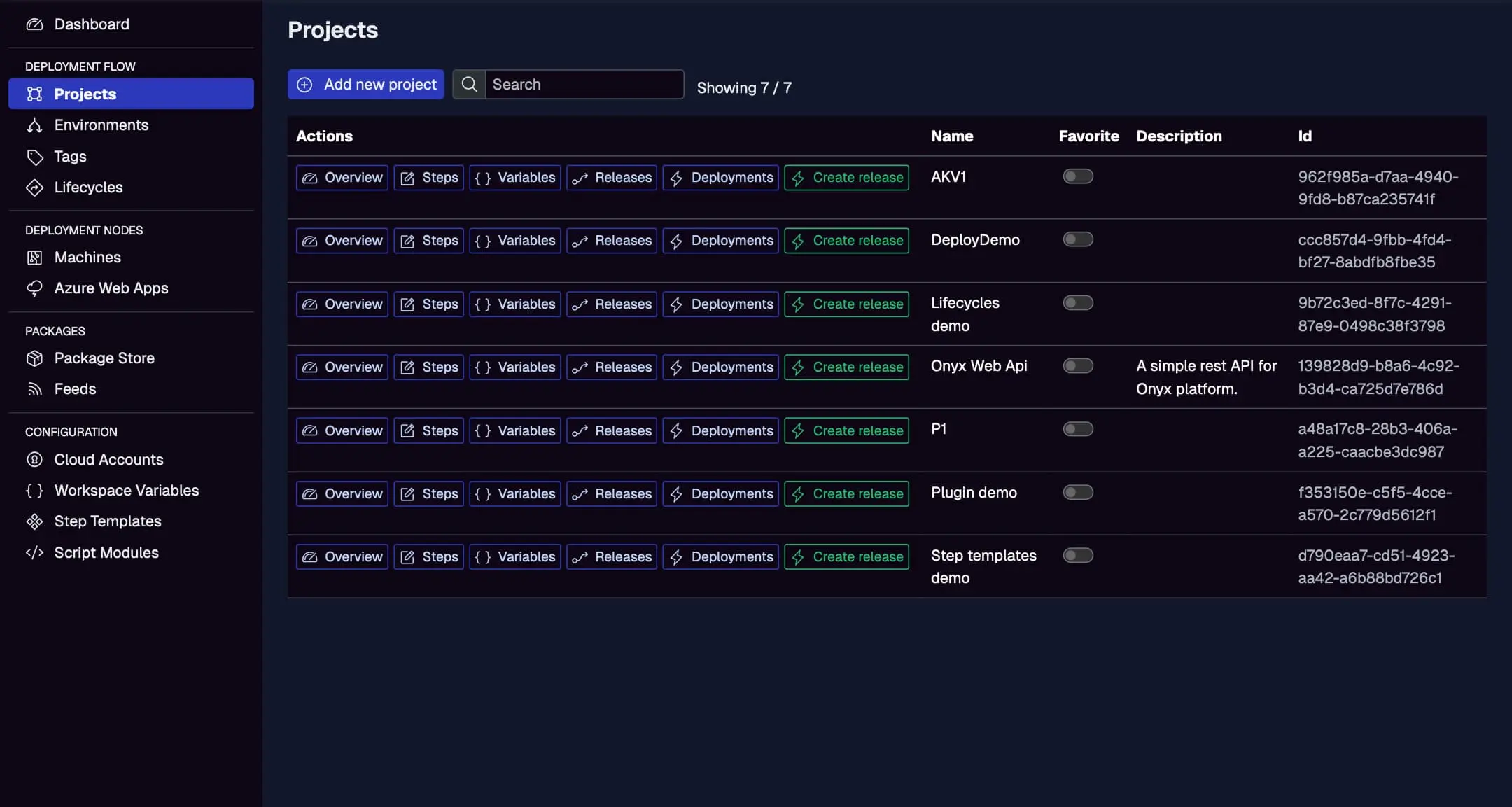
- A Jaws project mirroring your Bamboo plan, with steps, environments (e.g., Staging, Production), and a package store.
- Bamboo agents with curl (for REST) or PowerShell (for SDK).
- Optional: Jira integration for linking builds/deploys.
Mirror your Bamboo plans here as Jaws projects for smooth migration.
Step 1: Create a Service Account in Jaws Deploy
Service accounts enable secure, non-user API access—crucial for enterprise automation.
- In Jaws, go to Settings > Service Accounts.
- Create an account (e.g., "BambooMigrator") with scoped permissions (e.g., deploy to specific workspaces for compliance).
- Copy the ID and API key.
In Bamboo:
- Go to Administration > Overview > Security > Global variables (or plan variables).
- Add secured vars:
JAWS_API_LOGIN= ID,JAWS_API_PASSWORD= key (encrypt if sensitive).
See the Service Accounts and Automation Guide for enterprise RBAC tips.
Step 2: Choose Your Integration Method
- REST API: Use curl in Bamboo script tasks for HTTP calls. Simple for cross-platform agents.
- PowerShell SDK: Ideal for Windows agents; import and call high-level functions like
Invoke-ReleaseAndDeployProject.
Focus on REST for migrations, as it's quick to prototype without dependencies.
Step 3: Set Up the Integration in Bamboo
In Bamboo, add a script task to your deployment plan's job (or build plan's final stage) to call Jaws API. This example assumes a .NET build producing a .zip, uploaded then deployed via REST.
Example Bamboo Configuration
- In your Bamboo plan, add a stage/job for "Handover to Jaws" after artifact creation.
- Add a Script task (inline or file-based) with bash/PowerShell.
Sample Inline Script Task (Bash for REST)
# Fetch vars (Bamboo injects as env)
auth=$(echo -n ${bamboo_JAWS_API_LOGIN}:${bamboo_JAWS_API_PASSWORD} | base64)

# Upload artifact to Jaws package store (assume artifact shared as app.zip)
curl -X POST "<https://app.jawsdeploy.net/api/packagestore/package>" \\
  -H "Authorization: Basic $auth" \\
  -F "file=@app.zip" \\
  -F "packageId=my-app" \\
  -F "version=${bamboo.buildNumber}.0.0"  # Use Bamboo build number

# Create release
curl -X POST "<https://app.jawsdeploy.net/api/release>" \\
  -H "Authorization: Basic $auth" \\
  -H "Content-Type: application/json" \\
  -d "{\\"projectId\\": \\"your-project-id\\", \\"version\\": \\"${bamboo.buildNumber}.0.0\\", \\"packageVersions\\": {\\"my-app\\": \\"${bamboo.buildNumber}.0.0\\"}}"

# Deploy (extract releaseId from prior response; use jq if installed)
# For simplicity, chain or parse in script
For PowerShell SDK (on Windows agents):
# Download/import SDK
Invoke-WebRequest -Uri "<https://github.com/JawsDeploy/powershell-sdk/raw/main/JawsDeploySdk.psm1>" -OutFile "JawsDeploySdk.psm1"
Import-Module ./JawsDeploySdk.psm1

$env:JAWS_API_LOGIN = "${bamboo_JAWS_API_LOGIN}"
$env:JAWS_API_PASSWORD = "${bamboo_JAWS_API_PASSWORD}"

Invoke-ReleaseAndDeployProject -projectId "your-project-id" -version "${bamboo.buildNumber}.0.0" -environmentName "Staging"
During migration, start with a parallel Bamboo-Jaws plan: Run legacy deploys in Bamboo while testing new in Jaws.
Reference the API Reference for endpoints.
Step 4: Test and Monitor
- Trigger a Bamboo build/deployment.
- Check task logs in Bamboo.
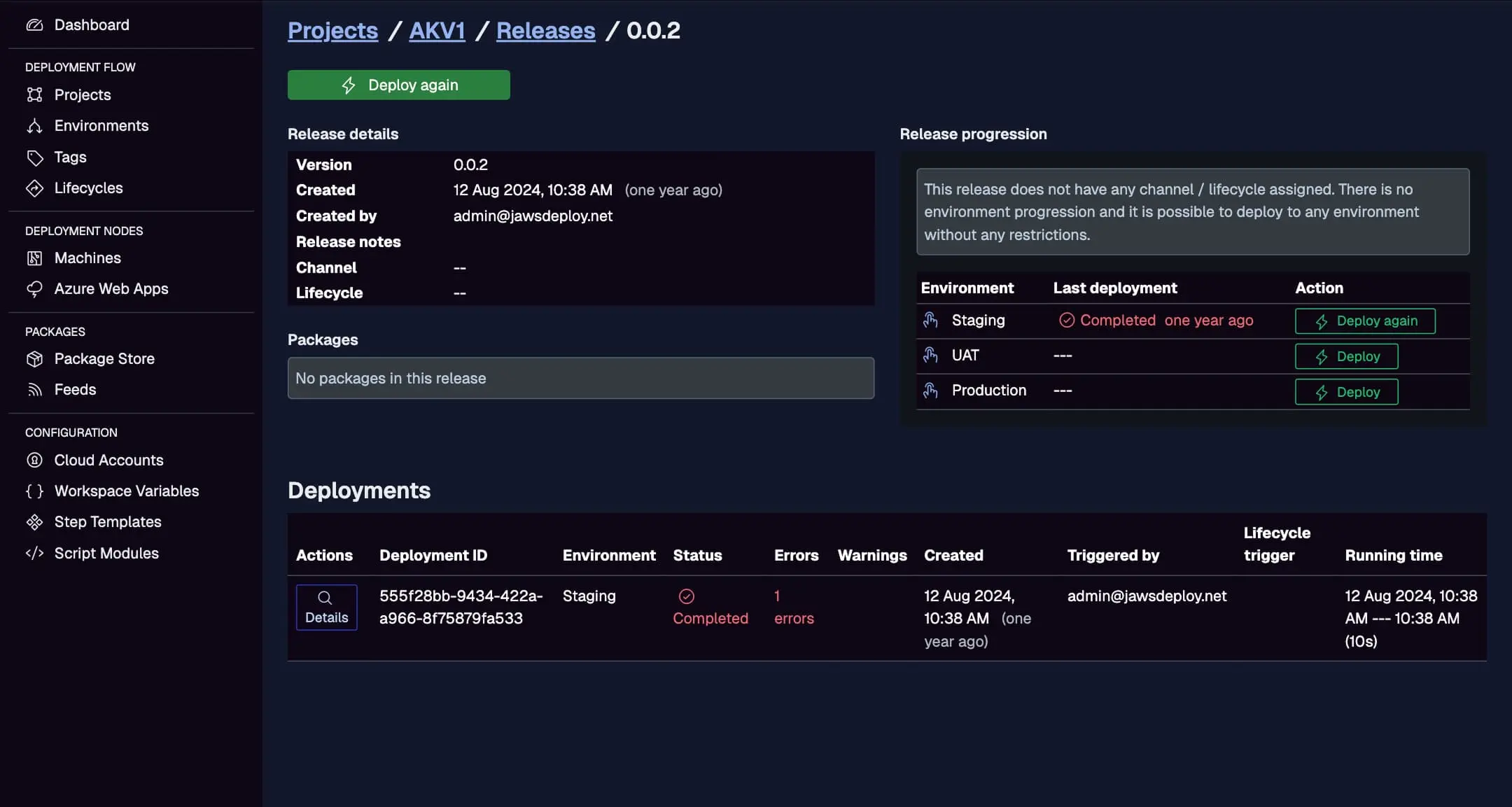
- In Jaws, view the Deployments tab for progress—use this for enterprise auditing.
Track migrated deploys here, comparing to Bamboo history.
For debugging, set __debug to true in Jaws variables during migration testing.
Best Practices for Enterprise Migrations
- Phased Approach: Migrate one plan at a time; use Jaws' import tools or guides for Bamboo-like structures.
- Jira Alignment: Link Jaws deploys to Jira issues via notes/API for traceability.
- Security: Scope service accounts to workspaces; integrate with enterprise SSO (OIDC in Jaws Stack).
- Scalability: Use Bamboo agents for builds, Jaws for parallel deploys—reduces agent needs over time.
- Cost Tracking: Monitor savings post-migration; Jaws' model avoids Bamboo's per-agent fees.
- Rollback: Leverage Jaws' release history for easy reversions during transition.
Troubleshooting Common Issues
- Auth Failures: Verify Bamboo var injection and Base64.
- Artifact Issues: Ensure shared artifacts accessible in tasks.
- SDK Errors: Check agent PowerShell version; fallback to REST.
- Migration Gaps: Compare logs; use Jaws' migration guide for concept mapping.
- Enterprise Scale: For large deploys, increase Bamboo timeouts.
Conclusion
Integrating Bamboo with Jaws Deploy is a strategic move for enterprises migrating to modern CD, offering simplicity, cost savings, and hybrid flexibility while maintaining Atlassian integrations.
For tailored migration advice, see Migrating from Octopus Deploy (adaptable to Bamboo). Explore the CI/CD Integration Guide. Start your migration—contact us for enterprise support! New to Jaws? Begin with Getting Started.