Project steps in Jaws Deploy are the core building blocks of your deployment workflows, defining the specific actions and logic that get executed when a release is deployed to targets. They encapsulate everything from simple script runs to complex operations like package deployments or service installations, making your projects flexible and powerful. Steps are what turn your high-level plans into actionable tasks, running on machines or cloud targets with support for scoping, conditions, and reusability.
Whether you're building a basic web app deployment or orchestrating enterprise-scale microservices, understanding steps helps you create efficient, maintainable logic. In migrations from tools like Bamboo or Octopus, steps map closely to tasks or stages, allowing you to replicate and optimize existing workflows. As of September 22, 2025, steps now include enhanced support for bash and Python alongside PowerShell, broadening language options.
This article explains what steps are, types available, how to define and order them, reusability via templates and modules, scoping/conditions, and best practices.
What Are Project Steps?
Steps are individual, configurable units within a project that contain the deployment logic to be executed. They specify actions like fetching secrets, installing services, or running custom code, and are executed in sequence or parallel during a deployment.
- Purpose: Steps focus on the "how" of deployment—e.g., deploying a package and adjusting configs—while projects group them into recipes.
- Execution: Steps run on assigned targets (machines or cloud apps), pulling artifacts from feeds and resolving variables at runtime.
- Flexibility: They can be scoped to specific environments, machines, or tags, ensuring logic only applies where needed.
In enterprise contexts, steps reduce script duplication from tools like Bamboo by centralizing reusable actions.
Types of Steps
Steps are based on templates, which provide pre-defined logic. Common types include:
- Run Script: The simplest and most versatile—execute custom PowerShell (default), with bash/Python support for cross-platform needs. Ideal for arbitrary tasks like database migrations or config tweaks.
- Deploy Package: Pull and extract packages (.zip, .tar.gz, .nupkg) from feeds, apply transforms (JSON/XML), and install to paths.
- Install Windows Service: Set up services with parameters like start mode or credentials.
- Azure-Specific: E.g., Azure Key Vault for secrets, or actions tied to Azure Web Apps.
- Certificate Management: Apply SSL certs from Windows Cert Store to IIS bindings, or install into certificate stores.
- Custom: Any logic encapsulated in templates or modules.
All steps are machine-oriented and PowerShell-based by default, but customizable.
For migrations, map Bamboo tasks (e.g., SSH/Command) to "Run Script" steps for quick adaptation.
Defining and Ordering Steps
- Add a Step: In your project > Steps tab > Add step. Select a template (e.g., "Run a PowerShell script") and configure properties like name, script body, or parameters.
- Ordering: Steps execute in the order listed—use drag-and-drop to rearrange. Sequential by default, but enable parallelism for independent steps.
- Configuration: Set inputs via UI fields (from templates), reference variables (#{VAR.name}), or outputs from prior steps.
Example: A web app project might have:
- Fetch secrets from Azure Key Vault.
- Deploy package to path.
- Run script to restart IIS.
In large setups, define steps to minimize dependencies for faster deploys.
Reusability with Step Templates and Script Modules
Steps promote reuse to avoid duplication across projects.
Step Templates
- What They Are: Reusable blueprints for steps, shared within workspaces.
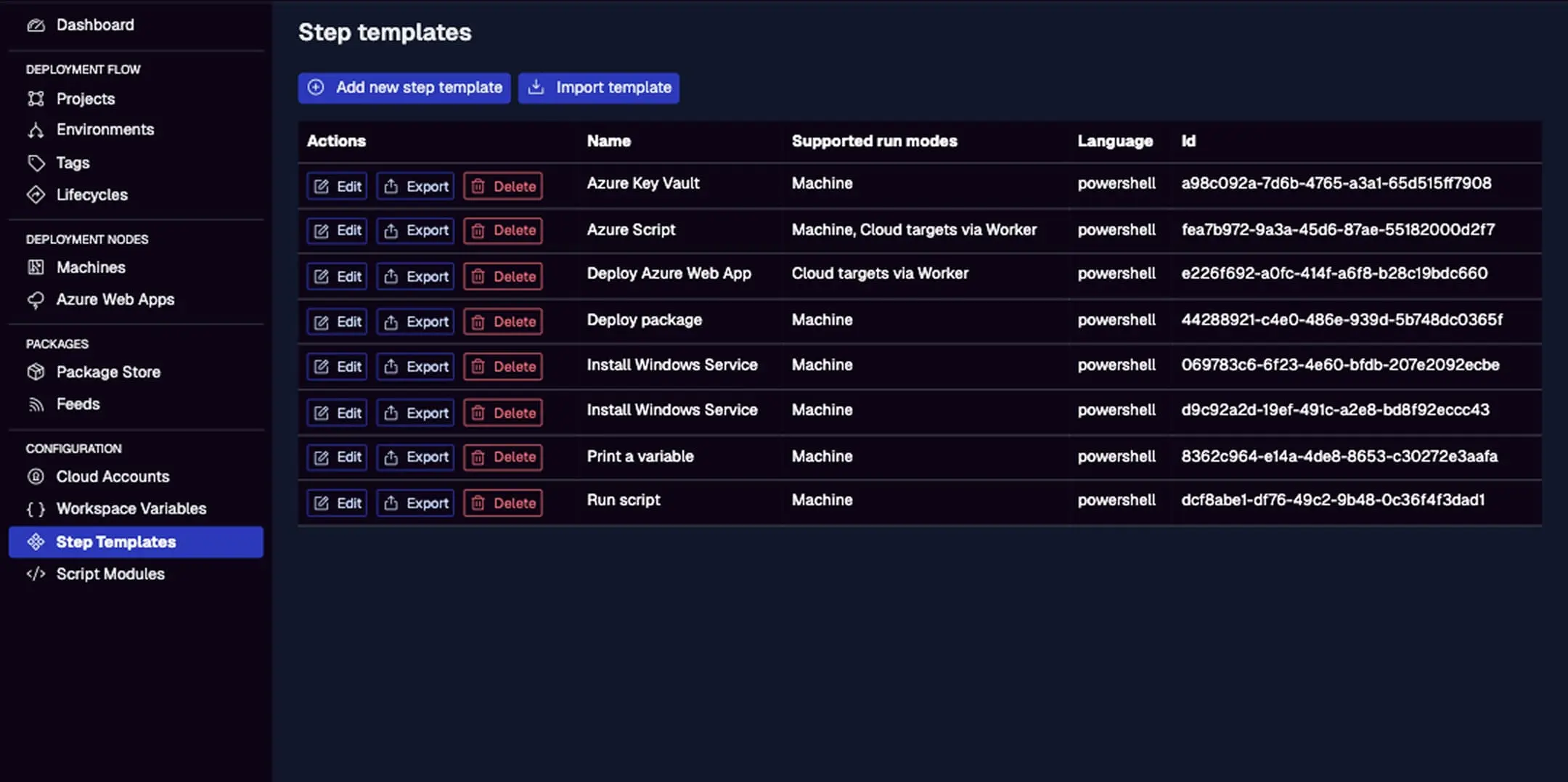
- Built-in Templates: Include "Run Script," "Deploy Package," "Install Windows Service," "Azure Key Vault," "Apply SSL Cert to IIS," etc.—all PowerShell-based with UI for params.
- Custom Templates: Create in Step Templates menu; define JSON for UI (e.g., fields for inputs) and embed PowerShell code. Export/import for sharing.
- Usage: Select a template when adding a step; it populates the logic.
For enterprises, build custom templates for standardized processes (e.g., compliance checks), easing migrations by replicating Bamboo task libraries.
This lists templates with names, supported modes (Machine), languages (PowerShell), and actions like Edit/Export/Delete. Use "Add new step template" for customs.
Script Modules
- What They Are: PowerShell modules (.psm1 files) with utility functions/commandlets for reuse in steps.
- Setup: Upload via Script Modules menu or API; enable per-project in the project's Script Modules tab (toggle "Import").
- Referencing: In a step's script:
Import-Module MyModule; Invoke-MyFunction -Param #{VAR.value}. - Benefits: Share code across projects/steps; modules download once per machine and import on run.
- Examples: A module with functions for logging, config parsing, or API calls—reduces boilerplate.
During Bamboo migrations, extract common scripts into modules for centralized maintenance.
Scoping and Conditions for Steps
- Scoping: Limit steps to specific environments, machines, or cloud targets—e.g., run a Prod-only compliance check. Use tags for dynamic groups (e.g., execute on "region-us" machines).
- Conditions: Skip steps based on config (e.g., variable checks like
if #{VAR.isEnabled} eq true). Add in step properties for runtime decisions.
This ensures precision, e.g., env-specific transforms or OS-targeted scripts.
Best Practices
- Keep It Simple: Start with built-in templates; add customs only for unique needs.
- Reuse Aggressively: Leverage templates/modules to avoid copy-paste—boosts maintainability in enterprises.
- Test Incrementally: Add steps one-by-one; use debug mode (
__debug = true) to verify logic. - Migration from Bamboo: Map tasks 1:1 to steps; automate via API for hybrid runs.
- Performance: Parallelize independent steps; monitor durations in dashboards.
- Security: Scope sensitive steps to trusted targets; audit via logs.
Conclusion
Project steps in Jaws Deploy empower you to build tailored, reusable deployment logic, streamlining workflows and easing enterprise migrations from tools like Bamboo.
For more, see Code Reuse with Script Modules or Step Templates. Create your first step—dive into a project now! New to Jaws? Start with Getting Started.